

FOR MASJID TV DISPLAYS
Signage Player
Always on. Even when the internet isn't.
Couldn't load pickup availability
- ✔ Auto-recovers after power outages
- ✔ Works offline for days without internet
- ✔ No ads, no streaming, no distractions
- ✔ Works with a free Masjidal account

Portrait Mode

24/7 Operation

Works Offline

Auto-Recovery

Distraction-Free

HDMI to Any TV

Wi-Fi

Real-time Sync

One-Time Setup

Auto Update
BUILT FOR MASJIDS
Reliable, focused, always on.
Every design choice serves one goal: your masjid stays sacred.
Stays on when your Wi-Fi doesn't
Internet drops happen. The Signage Player keeps displaying prayer times, iqamah, and your masjid's content for days using locally cached data. When your connection comes back, everything syncs automatically.
Auto starts after power outages
When power comes back, the Signage Player boots straight to your masjid's display. No remote, no menu navigation, no 'who has the keys to the prayer hall' emergency. Your screens just turn on and start working.
No ads. No streaming. No distractions.
Streaming sticks were built for movie nights, not sanctuaries. Every feature — from autoplay trailers to store promotions — pulls attention elsewhere. The Signage Player has none of that. It exists for one purpose: your masjid's content, on your masjid's screen, all day. Your masjid stays sacred.
Connected to your account
Your masjid's content syncs from your Masjidal dashboard in real time. Update prayer times, post announcements, schedule funeral notices, manage one screen or twenty — all from a single account.
Get Started
Setup in 3 Steps
Ships pre-configured for your masjid. A free Masjidal account is all you need to get your screens running.
Plug it in
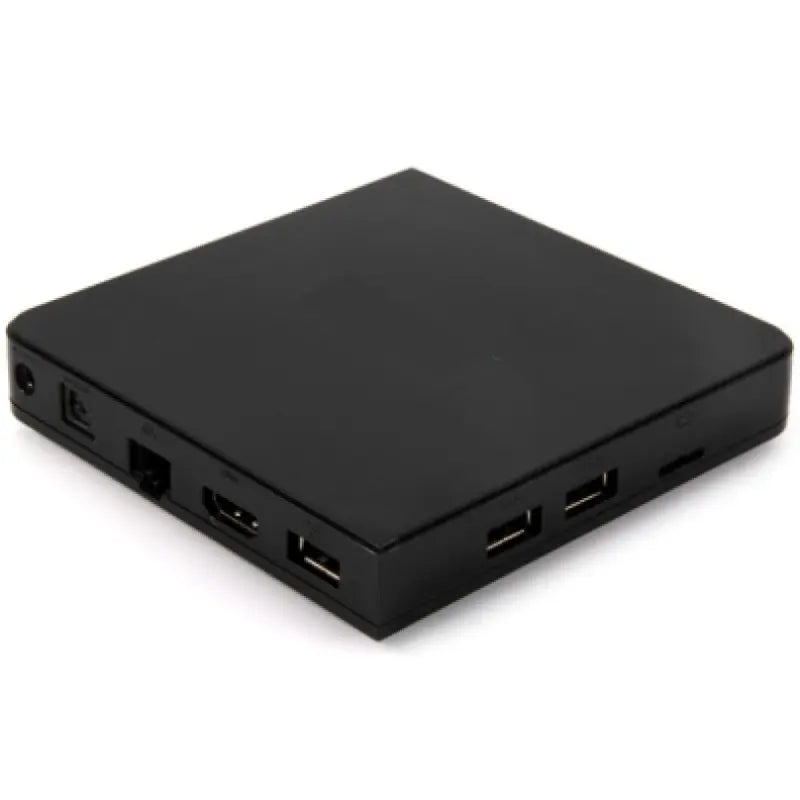
HDMI cable and power adapter included. Plug one end into the Signage Player, the other into any modern TV. The device hides discreetly behind the screen.
Connect & sign in
Connect to Wi-Fi or Ethernet, then sign in with your free Masjidal account — or create one in 30 seconds if you don't have one yet. The setup wizard walks you through everything on screen.
Start displaying
Your masjid's prayer times, iqamah, and content load automatically. The screen stays on, every day — no remote, no menu navigation, no babysitting required.
Why dedicated hardware
Signage Player vs other devices
Already own a Firestick, Chromecast, or Android TV box? The Al-Iqamah app works on those too. Here's why a dedicated player makes your setup bulletproof.
Both will display your prayer times. Only one stays running when something goes wrong.
Trusted by masjids globally
Powered by Masjidal — the platform 2,200+ masjids worldwide already trust for prayer times, content, and community engagement. The Signage Player brings that same reliability to your prayer hall displays.


Questions?
Answered.
-
Do I need a Masjidal account to use the Signage Player?
Yes — a free Masjidal account is all you need. It's how the Signage Player knows which masjid's prayer times to display. Sign up in 30 seconds, link the device, and you're ready. Advanced features like multi-zone displays and custom scheduling require Al-Iqamah Pro, but the core experience is fully free.
-
What TVs does the Signage Player work with?
Any modern TV with an HDMI input. We've tested it on screens from 24" all the way up to 85" — and it auto-adjusts to your TV's resolution, including 4K. No special TV brand or smart TV features required.
-
Does the Signage Player need internet?
Yes, since it's a cloud based solution, Internet connectivity is needed. However, the device caches your masjid's content locally and continues displaying prayer times, iqamah, and announcements for days even if your internet drops. It syncs new content automatically the moment your connection comes back.
-
What happens after a power outage?
The Signage Player boots back into Al-Iqamah automatically — no remote, no menu navigation, no manual restart. Your screens just turn back on and resume displaying your masjid's content within seconds of power being restored.
-
Wi-Fi or Ethernet — which should I use?
Either works. Wi-Fi is simpler for most setups. If your masjid's prayer hall has weak Wi-Fi signal, use the Ethernet port for a stable wired connection. The setup wizard handles both — pick whichever fits your space.
-
Can I manage multiple screens from one Masjidal account?
Yes. Link as many Signage Players as you need under a single account — entrance, prayer hall, women's section, school wing — and manage them all from one dashboard. With Al-Iqamah Pro, you can also display different content on different screens (multi-zone).
-
Does it support portrait (vertical) mode?
Yes. The Signage Player supports both landscape and portrait orientations. Mount your TV vertically, set the display mode in the settings, and your content rotates automatically. Please note that a paid subscription is needed for the portrait mode.
-
Does it auto-update?
Yes. The Signage Player receives the latest features, security patches, and improvements over the internet — no IT team needed. To install the updates, simply click the update button.
-
What's included in the box?
The Signage Player, power adapter, wireless mouse, HDMI cable, and a quick-start guide. Setup takes under 5 minutes — plug it into your TV, connect to the internet, sign in, and you're done.
-
What's the warranty and support policy?
The Signage Player comes with a 1-year hardware warranty. Setup support is included with every order, and our team is available by email and phone for as long as you have a Masjidal account.
READY TO SEE IT LIVE
See Al-Iqamah live in your masjid.
Book a 20-minute demo and we'll walk you through Al-Iqamah on your masjid's screens — prayer times, iqamah countdowns, multi-zone displays, and everything in between.
Free plan available · Setup in days · Live support from a Muslim-owned team
Or reach us directly.
masjidsupport@masjidal.com